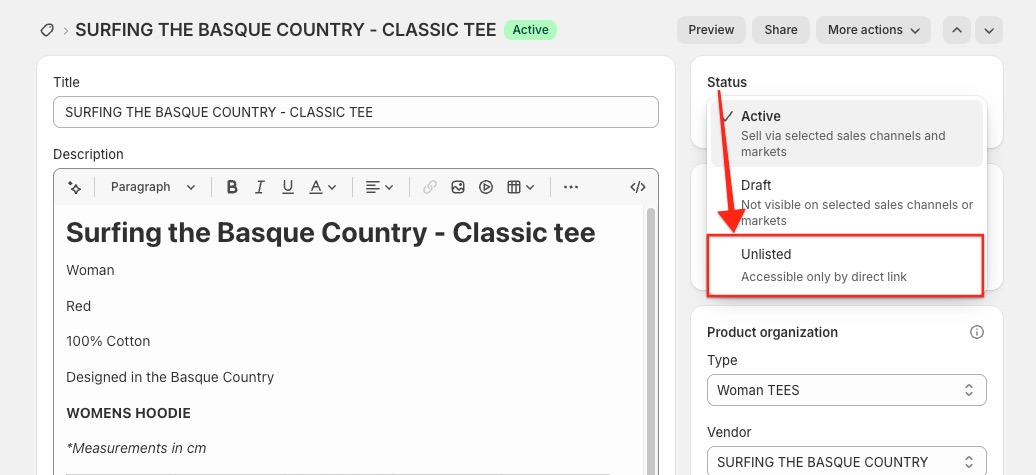
How do I hide my products from search, collections and my online store?
If you only sell certain products as part of a bundle, you may not want them showing up on your storefront on their own. Shopify's Unlisted product status handles this: it hides a product from normal discovery while keeping it fully sellable through your bundle.
What Unlisted does
When you set a product's status to Unlisted, the product can still be sold, but customers can't discover it normally on your storefront. In practice, that means:
- The product page still exists and keeps the same URL.
- Anyone with the direct product link can still open it.
- Customers can still add it to cart from that direct URL, unless you customize the product page to prevent that.
- It won't appear in your store's Shopify-powered:
- collection pages
- search results
- predictive search
- product recommendations
Search and discovery impact
The product is hidden from:
- search engines
- your XML sitemap
- Shopify Catalog
- Shop discovery surfaces
Shopify adds noindex and nofollow tags to the page, so search engines shouldn't index it.
Sales channel impact
- You can't publish unlisted products to third-party sales channels.
- In Shop, unlisted products are non-discoverable, even if they're published there.
Important caveats
- If another website already links to that product, the link can still send customers to the product page.
- Some third-party search or recommendation apps might still show the product if they don't support Unlisted.
- Some third-party apps may show the product as Active, even though Shopify labels it Unlisted in the admin.
Where to change it
- Open your Shopify admin.
- Go to Products.
- Select the product.
- Change its status to Unlisted.