
How to display bundle products in a carousel
By default, the Bundle Products block shows products in a grid. Switching its display mode to Carousel shows them in a horizontally scrolling row instead — useful when you have more products than you want to show at once, or want a more visual, swipeable browsing experience.
Before you start
This applies to the Bundle Products block in the Core template's V2 visual editor. Your bundle must have been built in the visual editor (not an older legacy bundle).
Turn on carousel display
- Open your bundle and select Launch design editor.
- Select the Bundle Products block on the canvas to open its settings.
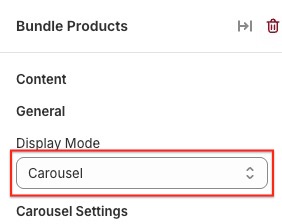
- In the General section, open the Display Mode dropdown.
- Choose Carousel (the other options are Grid and List).
Adjust how many products show at once
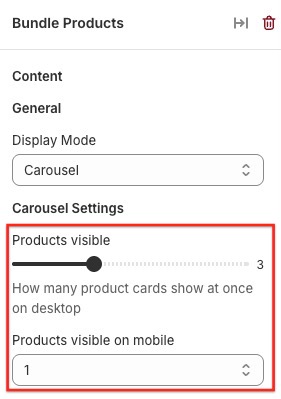
Choosing Carousel reveals a Carousel Settings section right below Display Mode:
- Products visible — how many product cards are visible at once on desktop (minimum 2, default 3).
- Products visible on mobile — how many are visible on smaller screens. The default leaves part of the next card peeking in at the edge, as a visual cue that the row scrolls.
Left/right arrows appear automatically so shoppers can click through the carousel instead of only swiping. If all your products already fit within the visible count, the arrows hide themselves automatically since there's nothing left to scroll to.
Spacing between cards
The carousel uses the same card spacing as your other bundle views. If you want more or less space between cards, that's a separate, bundle-wide setting — see How to customize your Bundle Products block for the Grid spacing setting.
Carousel with grouped products
If your Bundle Products block groups products into tabs (for example, by tag or category), Carousel display mode carries over into each tab — every tab shows its own scrollable carousel rather than reverting to a grid.
Troubleshooting
- The arrows aren't showing. This is expected once all products already fit inside the visible count — there's nothing to scroll to yet. Try lowering "Products visible" or adding more products.
- Mobile still shows too many or too few products. Double check "Products visible on mobile" separately from the desktop "Products visible" setting — they're independent.
- I switched back to Grid and my carousel settings disappeared. That's expected — the Carousel Settings section only shows while Display Mode is set to Carousel. Your values are kept if you switch back.