
Kitenzo A/B Testing: How to Split Test Your Bundles
Kitenzo offers built-in A/B testing to help merchants optimize their upsell offers. This native split-testing feature allows you to compare two different bundle configurations side-by-side to determine which one generates the highest conversion rate, revenue, and Average Order Value (AOV).
Unlike many Shopify bundle apps that require third-party integrations, Kitenzo includes native A/B testing (also known as split testing). This means you can create, launch, and analyze experiments directly within the Kitenzo admin without any additional code or apps.
Quick Summary
- What is it? A native experiment tool to test two bundle variants (Control vs. Variant).
- What can you test? Pricing strategies, product combinations, and bundle layouts.
- How does it work? Kitenzo splits your traffic (e.g., 50/50) and tracks real-time performance metrics.
- The Goal: To replace guesswork with data-driven decisions to increase store revenue.
What can you A/B test with Kitenzo?
By creating a "Primary Bundle" and a "Test Bundle," you can experiment with:
- Pricing: Compare a "Buy 3, Get 10% Off" vs. a "Buy 3, Save $10" offer.
- Product Selection: Test if a "Skincare Starter Kit" performs better with or without a specific accessory.
- Bundle Layouts: See if a "Build-Your-Own" (BYOB) layout converts better than a pre-curated fixed bundle.
- CTA Copy: Test different button text or offer descriptions to see what triggers more clicks.
How to set up your first A/B test
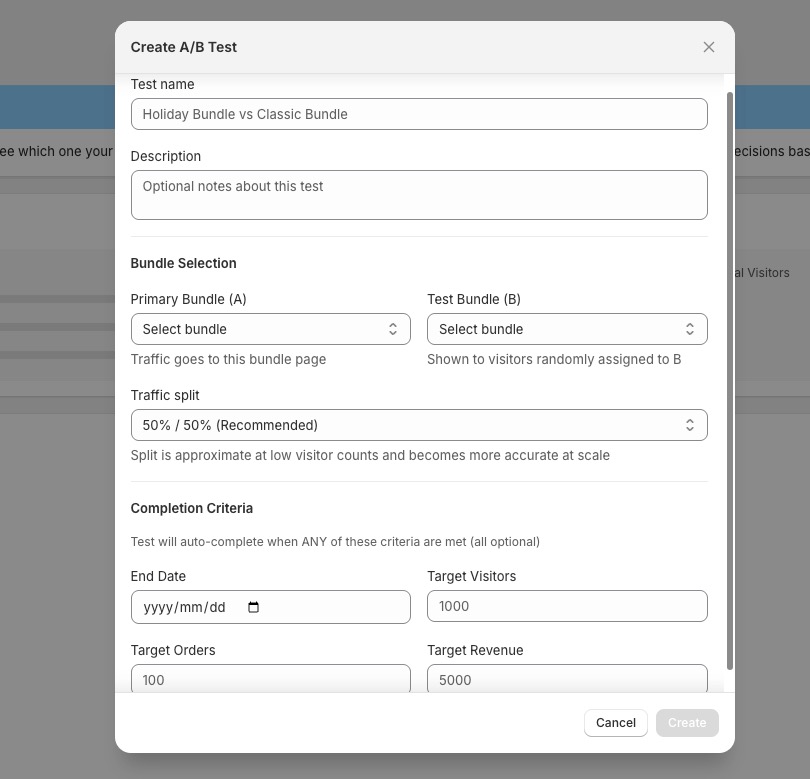
To begin your experiment, navigate to the A/B Testing tab in your Kitenzo sidebar and click + Create test.

1. Define your Test Details
- Test Name: Give your experiment a clear title (e.g., "Holiday Bundle vs. Classic Bundle").
- Description: Note your hypothesis (e.g., "Testing if a higher discount increases AOV during Black Friday").
2. Selection of Variants (Control vs. Variant)
- Primary Bundle (A): Select your current "Control" bundle. This is the version your customers usually see.
- Test Bundle (B): Select the "Variant" bundle. This is the version you are testing against the original.
3. Traffic Split
Choose how your visitors are distributed. We recommend a 50% / 50% split for the fastest, most statistically significant results. Kitenzo randomly assigns visitors to either Group A or Group B to ensure the data is unbiased.
4. Completion Criteria
You can set your experiment to auto-complete based on specific milestones:
- End Date: Run the test for a specific duration (e.g., 14 days).
- Target Visitors: End the test once it reaches a certain traffic volume (e.g., 1,000 visitors).
-
Revenue/Order Goals: Automatically stop the test once it has generated a set amount of sales.
Analyzing results and picking a winner
Once your test is running or completed, Kitenzo provides a detailed dashboard of Performance Metrics to help you identify the winning variant.
Key Metrics to Track:
- Conversion Rate: Which bundle turned more browsers into buyers?
- Revenue Per Visitor (RPV): Which version is more valuable on a per-click basis?
- Average Order Value (AOV): Did one bundle encourage customers to spend more per transaction?
- Total Orders & Revenue: The raw impact on your bottom line.
Declaring a Winner
Under the Choose Winner section, you can review the data and select the bundle that performed best. Once you have identified the top performer in the Choose Winner section, you will need to manually update your links or navigation to point toward that specific bundle.

Use Cases: Merchant Scenarios
- The "Volume vs. Value" Test: A homeware brand tests a 3-item bundle against a 5-item bundle to see if the higher item count increases AOV without hurting the conversion rate.
- The "Discount Type" Test: A beauty retailer tests a "20% Off" bundle against a "Buy Two, Get One Free" offer to see which phrasing resonates more with their specific audience.
- The "New Product" Test: A clothing store tests adding a new accessory to their "Best Sellers" bundle to see if it increases total revenue or if it's better kept as a separate purchase.
A/B Testing FAQs
Q: Which Shopify bundle app supports A/B testing?A: Kitenzo is one of the few Shopify bundle apps that offers native, built-in A/B testing, allowing you to split test bundle offers without external tools.
Q: Can I run multiple A/B tests at once?A: While you can manage several tests across different bundles, Kitenzo prevents you from including the same bundle in more than one active test. If you attempt to start a test using a bundle that is already part of another live experiment, the system will display a warning and block the action. This guard is in place to protect the integrity of your data and prevent conflicting experiences for your customers.
Q: How many visitors do I need for a successful test?A: While Kitenzo will track data for any amount of traffic, we recommend reaching at least 500–1,000 unique visitors per variant to achieve statistical significance.
Q: Does A/B testing slow down my store?A: No. Kitenzo’s A/B testing is built for performance and loads server-side, ensuring that your site speed remains fast while the experiment runs.